
WooCommerce Advanced Files Uploader
Empower your customers to personalize their products with our Advanced Files Uploader for WooCommerce.
Advanced Files Uploader Global Display Settings
Global display settings control how upload fields and uploaded file summaries appear across the store.
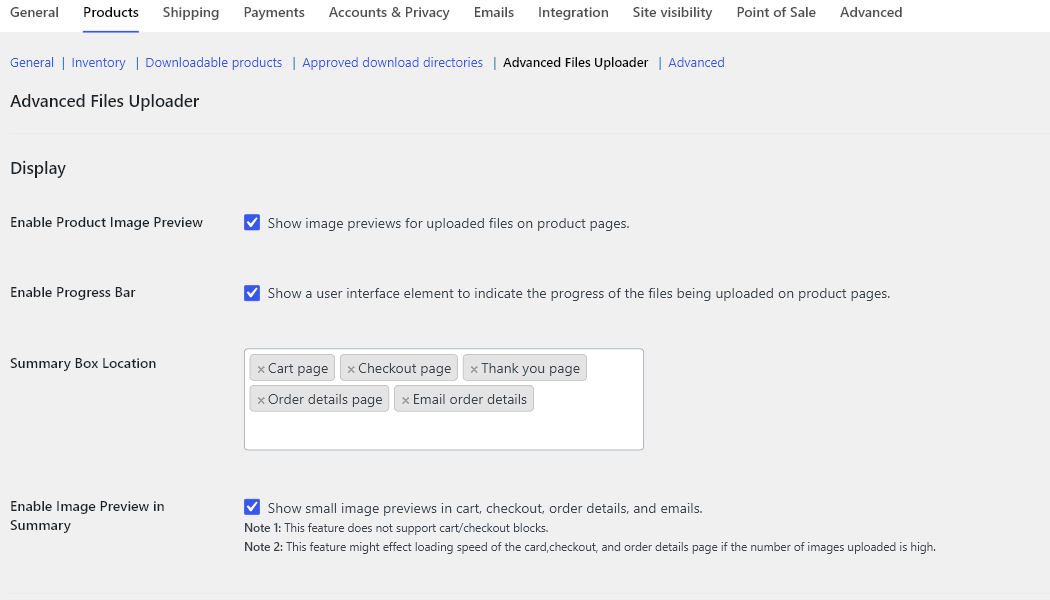
Product image preview
Enable Product Image Preview shows image previews for uploaded files on product pages. Keep this enabled for print, personalization, artwork proofing, photo products, and any product where the customer should confirm the selected file before adding to cart.
This setting applies to image files. Non-image uploads can still be accepted when the product file types allow them, but they do not render as image previews.
Upload progress bar
Enable Progress Bar shows upload progress while files are being sent from the product page. Keep it enabled when products accept large image, archive, audio, video, Adobe, or Office files.
The progress bar is also useful during support because it makes it clear whether the upload failed before completion or failed later during add-to-cart validation.
Summary box locations
Summary Box Location controls where uploaded file details are shown after a customer adds a product to the cart. Available locations are:
- Cart page.
- Checkout page.
- Thank you page.
- Order details page.
- Email order details.
For most stores, enable cart, checkout, thank-you, order-details, and email summaries. This gives customers a chance to confirm the file before purchase and gives store staff a clear order record after checkout.
Summary image preview limitation
Enable Image Preview in Summary can show small image previews in cart, checkout, order details, and emails. The plugin settings note two important limitations:
- Summary image previews are not supported in WooCommerce cart and checkout blocks.
- Summary image previews can affect loading speed when many images are displayed in cart, checkout, or order views.
Use filename summaries for high-volume upload stores. Use image summaries when visual confirmation is more important than keeping the cart and order screens lightweight.