
Carticy Conversions for WooCommerce
Your thank-you page misses conversions every day — abandoned redirects, ad blockers, Safari, consent banners. Track from the order instead, and stop under-counting what your ads actually earned.
Connect GA4, Google Ads, and the Meta Pixel
Carticy Conversions uses your own platform IDs, so your data flows straight to Google and Meta and never passes through us. The Connect step is built to make finding those IDs painless: every field has an inline “Where do I find this?” walkthrough with numbered steps and real screenshots, so you don’t have to leave the wizard or dig through Google and Meta on your own.
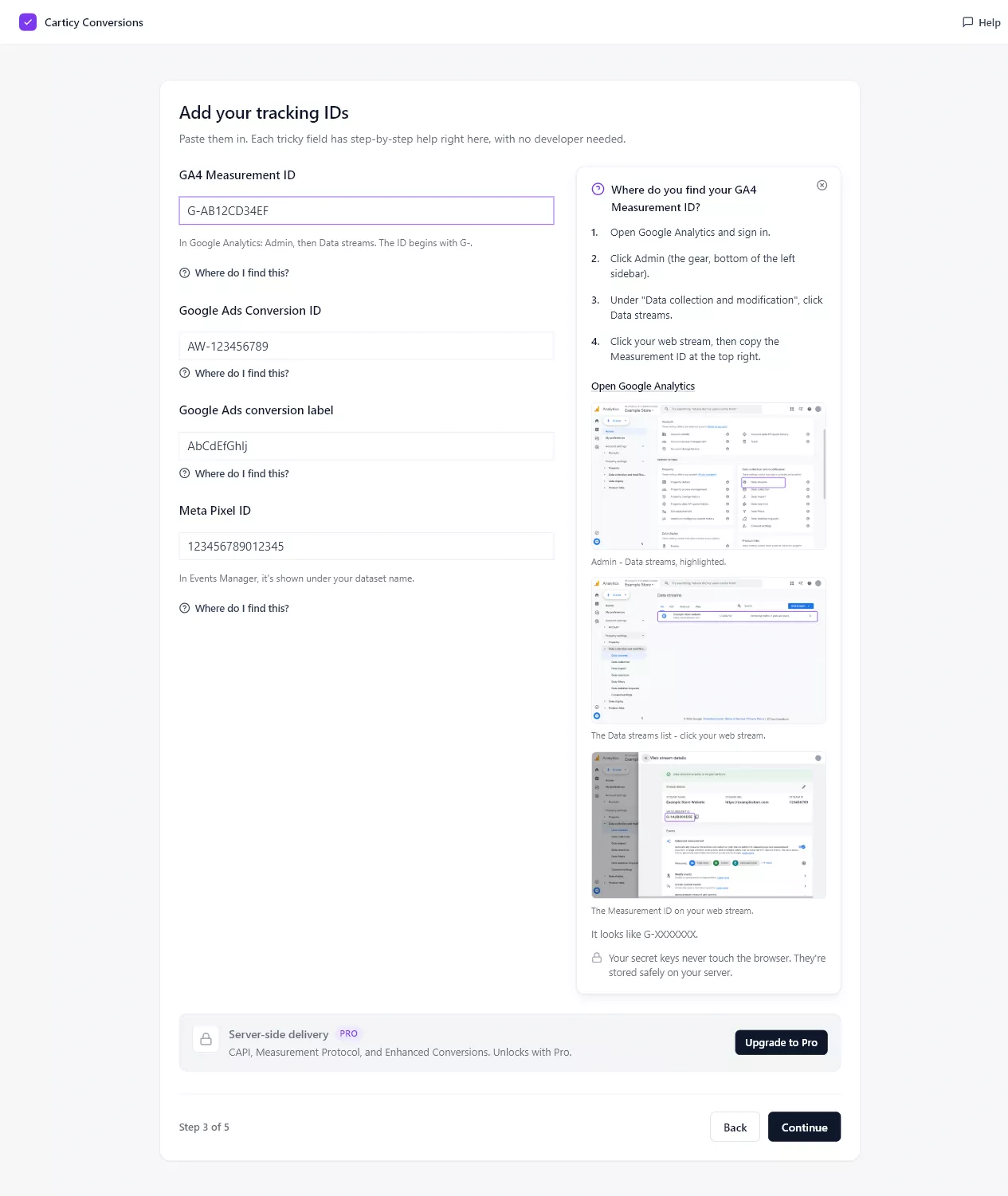
GA4 Measurement ID
In Google Analytics, open Admin (the gear icon), then under Data collection and modification choose Data streams. Click your web stream and copy the Measurement ID at the top right. It looks like G-XXXXXXX.
Google Ads Conversion ID and label
In Google Ads, open Goals → Conversions → Summary. If you don’t have a conversion action yet, create a website Purchase action first. Open the action and choose Tag setup, then “Use Google Tag Manager.” The Conversion ID (AW-XXXXXXXXX) and Conversion label are both listed there.
Meta Pixel ID
Open Meta Events Manager (from facebook.com, go to Ads Manager, then All tools, then Events Manager) and click Datasets in the left rail. Your pixel is listed with its ID under its name. Meta now calls this a Dataset ID, but it’s the same 15–16 digit number as your Pixel ID.
Direct tags or Google Tag Manager
Most stores should pick Direct: the plugin installs and fires the tags for you, with no Tag Manager involved. If you already run GTM, choose that mode instead and the plugin prepares a ready-made container file for you to download and import. It never edits or publishes your container for you. Either way, the events are identical and deduplicated.
Existing tags are detected automatically
If another plugin or your theme has already installed a GA4, Google Ads, or Meta tag, Carticy Conversions spots it during setup and asks what you want to do: attach to the existing tag, replace it, or keep both. That keeps you from firing two pixels and double-counting conversions.