How to Fix PayPal reCAPTCHA Failing on WooCommerce Checkout
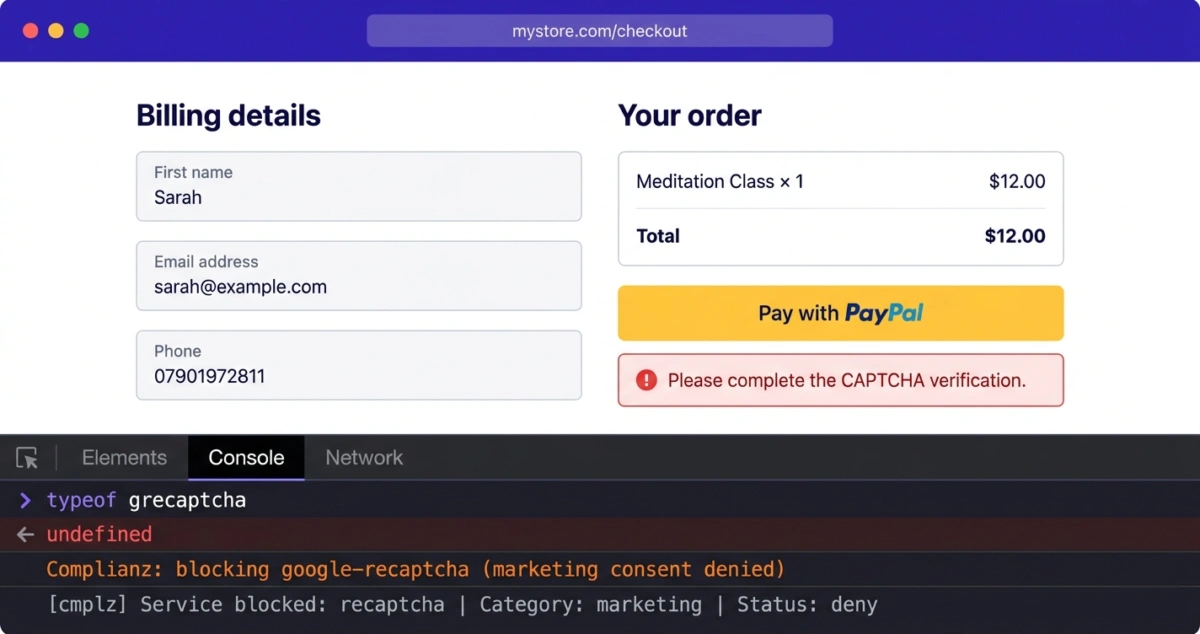
You enable reCAPTCHA in WooCommerce PayPal Payments and everything looks normal. No errors in the console, PayPal button renders fine, checkout page loads without a hitch. A customer fills out the form, clicks Pay with PayPal, and gets “Please complete the CAPTCHA verification.” There’s no CAPTCHA anywhere on the page. Nothing to complete. The checkout just refuses the order with zero indication of what went wrong.
We recently debugged this exact issue on a live WooCommerce store. The owner had spent hours working through the problem with ChatGPT, chasing a Content Security Policy issue that turned out not to exist. The actual cause was two plugin conflicts that silently prevented reCAPTCHA from loading on the checkout page.
What actually happens
PayPal Payments (PPCP) includes a reCAPTCHA integration for fraud protection. When enabled, it loads Google reCAPTCHA v3 in the background and falls back to v2 if the score is too low. A token gets generated and sent along with the payment request to verify the buyer is human.
When something prevents reCAPTCHA from loading, that token never gets generated. The customer clicks pay, the checkout finds no token, and it throws a CAPTCHA verification error. The whole thing is invisible. The PayPal button renders. The form works. The console is clean. There’s nothing to suggest reCAPTCHA failed to load until you actually attempt a payment.
We confirmed this during testing by opening the browser console on the checkout page and typing typeof grecaptcha. It returned "undefined". The reCAPTCHA container div was present in the DOM but completely empty, because no script ever loaded to populate it. Zero reCAPTCHA script tags existed on the page.
The CSP errors that weren’t there
In this case, the store owner was seeing Content Security Policy errors in their browser console with SHA256 hashes blocking inline scripts. ChatGPT agreed that the site was sending restrictive CSP headers, and they spent considerable time trying to track down where those headers were being set. Their host said it wasn’t server-level. Disabling plugins didn’t help. Editing .htaccess didn’t help.
We checked the actual HTTP response headers on the checkout page. The only CSP header was content-security-policy: upgrade-insecure-requests, which just forces HTTPS. No script restrictions at all. We also checked the page source for any <meta http-equiv="Content-Security-Policy"> tags. Nothing.
The CSP errors the owner was seeing contained references to kaspersky-labs.com directly in the directive. A website would never whitelist Kaspersky domains in its own CSP, which strongly indicates the errors were being injected by a Kaspersky antivirus browser extension on the owner’s machine, not by the server. This is what sent the troubleshooting down the wrong path. The errors were real in their browser, but no amount of server-side changes would fix something injected locally by antivirus software.
If you’re seeing CSP errors that reference kaspersky-labs.com or gc.kis.v2.scr, test in a clean browser with no extensions before doing anything else.
Complianz was blocking reCAPTCHA
The first real problem was Complianz, one of the most popular GDPR cookie consent plugins for WordPress. Complianz had detected Google reCAPTCHA as a third-party service and was configured to block it until the visitor consented to marketing cookies.
We verified this in the database: block_recaptcha_service was set to yes inside the cmplz_options serialized array. This tells Complianz to intercept all scripts matching google.com/recaptcha and block them until marketing consent is given.
reCAPTCHA is a security and fraud prevention mechanism, not a marketing tool. But Complianz was treating it like a tracking script. For a UK-based store under GDPR, most visitors will deny or ignore marketing consent, which means reCAPTCHA would never load for the majority of customers.
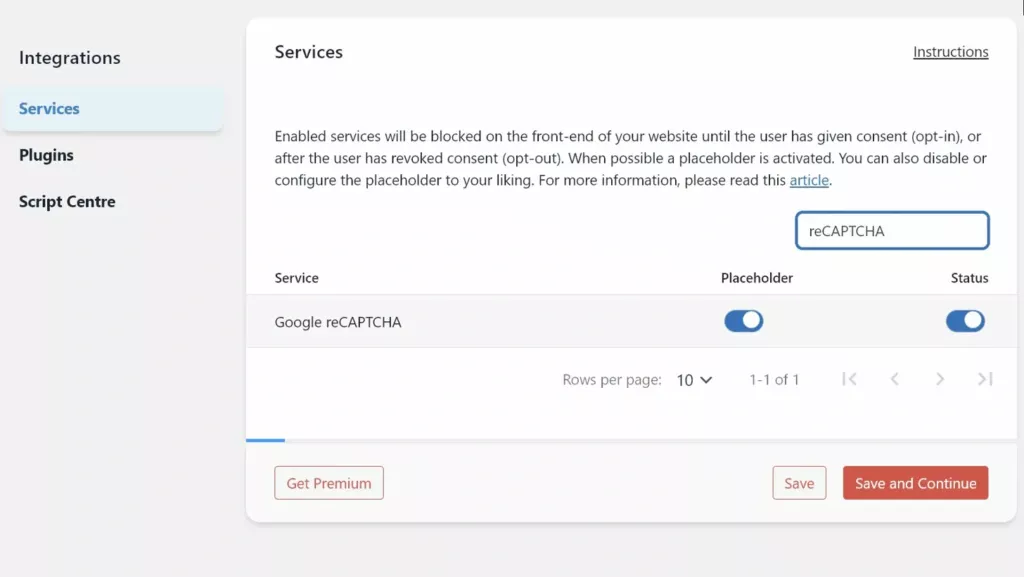
The fix: Go to Complianz > Integrations > Services. Find Google reCAPTCHA and toggle the Status switch to off. This stops Complianz from blocking reCAPTCHA scripts before consent.
WPForms was stripping reCAPTCHA
The second problem was WPForms Lite. We found recaptcha-noconflict set to true in the WPForms settings. When this mode is active, WPForms deregisters any reCAPTCHA script on the page that doesn’t belong to WPForms. The intention is to prevent multiple reCAPTCHA instances from conflicting, but it also removes the reCAPTCHA scripts that PPCP depends on for fraud protection.
This conflict is independent from Complianz. Even if a visitor accepts all cookies and Complianz lets the scripts through, WPForms would still strip PPCP’s reCAPTCHA enqueue. We weren’t able to test this path independently during our investigation because Complianz was blocking the scripts earlier in the pipeline, but the expected behavior based on the setting and WPForms documentation is clear.
The fix: Go to WPForms > Settings > CAPTCHA and uncheck No Conflict Mode. Google’s reCAPTCHA API handles multiple instances on a single page without issues. If you notice duplicate CAPTCHA challenges on a page that has both a WPForms form and WooCommerce checkout, address that per-page rather than using a global setting that strips scripts from other plugins.
Why This Was So Hard to Find
On this site, both conflicts were active at the same time. Complianz blocked reCAPTCHA for anyone who denied marketing cookies. WPForms was set to strip it for everyone else. The result: PPCP reCAPTCHA could never load for any visitor, regardless of their cookie preferences.
The store owner had tried disabling all plugins one by one without finding the source. That makes sense, because the failure was completely silent. No console errors, no broken UI, no missing buttons. The PayPal button rendered fine. The only indication was the CAPTCHA verification error at the moment of payment, and by that point, the owner was looking at CSP errors from Kaspersky in their browser and attributing the failure to that.
Three separate issues, all happening at once: Kaspersky injecting misleading CSP errors, Complianz blocking reCAPTCHA scripts, and WPForms stripping whatever got through. Each one on its own would have been easier to isolate. Together, they created a debugging nightmare that led the troubleshooting in the wrong direction entirely.
How to Verify the Fix
After making both changes, test the full checkout flow:
- Open an incognito browser window with no extensions.
- Go to your store and deny cookies on the consent banner.
- Add a product to your cart and go to checkout.
- Open the browser console and type
typeof grecaptcha. It should return"object". - Complete a test PayPal payment. It should go through without CAPTCHA errors.
- Repeat the test but accept all cookies, to confirm both paths work.
If grecaptcha still returns "undefined", check whether another cookie consent or security plugin is intercepting reCAPTCHA scripts. The diagnostic approach is the same: check what’s actually on the page, not what your browser console reports when extensions are running.
Avoiding the problem entirely
The problem runs deeper than settings. reCAPTCHA loads third-party scripts from Google, which puts it in the crosshairs of every cookie consent plugin and GDPR compliance tool. Any time you add a consent plugin, update Complianz, or install a form plugin with its own reCAPTCHA, you risk breaking the payment flow.
We built Checkout Shield to avoid this class of problems. It protects the WooCommerce checkout without loading external scripts. Everything runs server-side, so there’s nothing for a cookie consent plugin to block, no third-party JavaScript to conflict with, and no dependency on Google’s infrastructure. It works alongside PayPal’s fraud tools rather than competing with them for script loading priority.
If reCAPTCHA keeps conflicting with your consent or form plugins, it might be worth considering whether external CAPTCHA is the right fit for your checkout.
About the Author