

Deposits & Payment Plans for WooCommerce
Deposits and payment plans for WooCommerce with any amount, any date and any number of payments, or a balance charged only when you decide, held back from fulfilment until they clear. Charged automatically on 30+ gateways when WooCommerce Subscriptions is active.
The official deposits plugin cannot charge the balance at all: it emails the customer and hopes. This one takes the deposit, then charges the rest to the card they already used, on any gateway that supports WooCommerce Subscriptions.

- 7-day money-back guarantee
- Last updated September 23, 2026
Key Highlights
Discover what makes this plugin stand out
1
Any amount, any date, any number of payments
Not a deposit field and a balance field. An ordered schedule of two payments or twelve, each a fixed amount or a percentage, due on a relative offset, a fixed calendar date, counted backwards from a deadline, or collected when you decide. Plans attach per product or per variation, and the figure on the product page is the figure taken at checkout.
2
Charged automatically on 30+ gateways, not three
Other plugins hand-build integrations for Stripe and PayPal and stop there. This one drives the mechanism every WooCommerce Subscriptions-compatible gateway already implements, so Authorize.Net, Braintree, Square, Elavon and Moneris work the same way Stripe does. Automatic collection requires WooCommerce Subscriptions; without it the plan still runs and the customer pays by link.
3
Pre-orders that charge, or refund, everyone at once
Take a small deposit and leave the rest with no date. When the run goes ahead, charge every balance for the product in one reviewed action. When it does not, cancel every order and refund every deposit through the card it was paid with, in one reviewed action, with any refusal left for you in the gateway's own words. Nothing ships before the payment you nominate clears, and no order is ever cancelled silently.
Screenshots
See the plugin in action



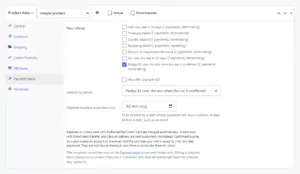

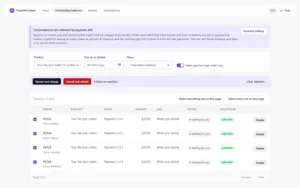

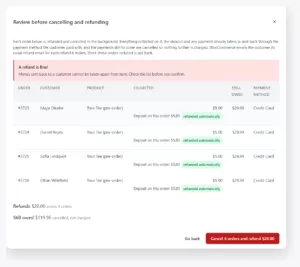

1 of 10
Features Overview
Features
Description
Schedules, not two fields
A plan is an ordered list of entries. Each carries a sequence, a fixed amount or a percentage, a due rule, whether it is the deposit, and whether it releases fulfilment. Two entries or twelve. Percentages resolve to literal amounts when the plan is sold, so a later price change never rewrites what a customer already agreed to pay.
Due dates that count backwards from your date
Due rules are a relative offset, a fixed calendar date, or an offset counted back from a deadline. A course on 12 June with the balance due seven days before means a January buyer and an April buyer get different dates from the same plan, and both are settled before the day. A fixed offset from checkout cannot express that.
Collect a payment when you decide
A payment can have no date at all. The schedule never charges it; you collect it from the Outstanding balances screen, or with Charge now on the order, once the run, the print or the event is confirmed. The customer sees it as "When your order is confirmed". The builder refuses the shapes that cannot work, in plain words: never the deposit, never in a repeating plan, always after every dated payment.
Automatic collection on any Subscriptions-compatible gateway
Balances are charged off-session against the card used at checkout, through the same mechanism every WooCommerce Subscriptions-compatible gateway already implements. Verified on four separate gateway families covering most of the market. Requires WooCommerce Subscriptions to be active; a store without it still runs plans and collects by customer-paid link.
An account and a saved card on every plan checkout
A customer buying on a plan creates an account at checkout, and the card they pay with is saved to it for the later payments, on the classic checkout and on Checkout Blocks. They are told so in one sentence beside the schedule, in place of the save-card box, and there is no box to untick. An order that arrives with no saved card anyway says so the moment it is paid, and its payments go out as links.
Repeating plans for recurring charges
Beyond paying an order off, a plan can split a recurring charge into a repeating cycle of different amounts, such as a first payment that carries shipping and a second that does not, repeating every renewal. The schedule wraps rather than ending.
Fulfilment held until the money arrives
Any entry can be the one that releases fulfilment. Until it clears, the order stays in a dedicated status that fulfilment integrations do not export, confirmed against WooCommerce's native Order Fulfillments feature on a live store rather than assumed. Every transition leaves an order note explaining itself.
Batch balance charging
Filter outstanding balances by product or due date, review the selection and its total, and confirm once. Each charge runs in the background through the same guarded path a scheduled charge uses, so a hundred balances cannot time out a request or double-charge an order the scheduler is already working on. Failures surface with the gateway's own reason.
Cancel a campaign and refund everyone in one action
Select the orders on Outstanding balances, choose Cancel and refund, and read a review that names every refund it will make, order by order, and every order it cannot handle with the reason. Confirm once and each order is refunded through the payment method the customer paid with, its remaining payments cancelled and its stock put back, in the background. A refund the gateway refuses stops that order alone, with the gateway's words, and nothing on it is cancelled.
Tax apportioned, not deferred
Every entry carries its proportional share of the tax on the goods, per rate, and the shares sum exactly. A store entering prices tax-inclusive shows the same deposit on the product page as it takes at checkout. The arithmetic error that produces a different figure in the cart is the one this was built against.
Coupons, refunds and one order
A coupon discounts the order, not merely the first payment. Later payments relate back to the original order instead of orphaning into separate ones. A refund reduces the plan and leaves already-settled payments untouched; a full refund cancels what remains and stops the schedule.
Never marked paid without the gateway saying so
A payment reaches a paid state only from an observed gateway result on the payment order, never from a charge attempt's return value. Retries are bounded and visible, an exhausted plan moves to an overdue status that alerts you, and a part-paid order is never cancelled silently.
Classic, Blocks, HPOS and legacy
Works on the classic shortcode checkout and the block (Store API) checkout, with the amount reaching the gateway proven identical on both. Compatible with High-Performance Order Storage and legacy post storage, both exercised on every release.
Pricing Plans
Choose the plan that fits your needs
Most Popular
Annual License
Deposits, payment plans and automatic collection for one store.
$99.00 Year
- Plans:
- Any number of payments, from two upwards
- Fixed or percentage amounts per payment
- Relative, fixed-date, or count-back-from-a-deadline due dates
- A payment with no date, collected when you decide
- Repeating plans that split a recurring charge
- Reusable plan templates, per product or per variation
- Collection:
- Automatic charging on any Subscriptions-compatible gateway
- Needs WooCommerce Subscriptions, sold separately by WooCommerce
- An account and a saved card on every plan checkout
- Customer-paid links for gateways that cannot store cards
- Bounded retries, overdue status, and a merchant alert
- Batch-charge a whole pledge window in one reviewed action
- Cancel and refund a whole campaign in one reviewed action
- Order handling:
- Hold fulfilment until a nominated payment clears
- Every payment tied back to the original order
- Correct tax, coupons and refunds on a part-paid plan
- Classic and Blocks checkout, HPOS and legacy storage
- Support & updates:
- 1 year of updates
- 1 year of priority support
- 7-day money-back guarantee
Lifetime License
Best value: pay once, deposits and payment plans forever.
$299.00 One-Time
- Everything in Annual, plus:
- Lifetime updates (never pay again)
- Lifetime priority support
- One site license
- Plans:
- Any number of payments, fixed or percentage
- Deadline-based schedules for dated events
- Payments collected when you decide, for pre-orders and pledges
- Repeating plans that split a recurring charge
- Collection:
- Automatic charging on any Subscriptions-compatible gateway
- Needs WooCommerce Subscriptions, sold separately by WooCommerce
- An account and a saved card on every plan checkout
- Batch charging, cancel and refund, retries and overdue handling
- Order handling:
- Fulfilment held until paid
- Correct tax, coupons and refunds
- Best long-term value
Frequently Asked Questions
Get answers to common questions
For automatic collection, yes, and it is worth understanding before you buy. WooCommerce can store a customer’s card but provides nothing to charge one later. That capability lives inside each payment gateway, and every gateway only switches it on when WooCommerce Subscriptions is present. We verified this on four separate gateway families.
Without Subscriptions the plugin still works: you build any schedule you like and the customer pays each instalment from a link or their account, which is what the official deposits plugin does today. It simply is not automatic.
Any gateway that supports WooCommerce Subscriptions, which is around thirty of them, including Stripe, PayPal Payments, WooPayments, Authorize.Net, Braintree, Square, Elavon and Moneris.
That is the honest claim and the one we test against. We do not claim all payment methods, because a gateway that bills on its own schedule bypasses the mechanism entirely. Where that happens the plugin refuses the plan and tells you, rather than silently collecting nothing.
Yes. A plan is an ordered schedule of any length from two upwards, and each entry is independently a fixed amount or a percentage.
$500 now, then three payments of $250 is a normal plan here, not a workaround. Most plugins in this category cap at a deposit and a balance.
Yes, and this is exactly why the deadline rule exists. An entry can be due a number of days, weeks or months counted backwards from a deadline rather than forwards from purchase.
Set the course date on the product and the balance falls due before it, whether the customer books six months ahead or the week before. A fixed offset from checkout cannot do this: someone booking on Friday for a Saturday class would otherwise have thirty days to pay for a course they had already attended.
Yes. Mark which payment releases fulfilment and, until it clears, the order stays in its own status that fulfilment integrations do not pick up.
We confirmed this against WooCommerce’s own Order Fulfillments feature on a live store, with a control order to prove the exclusion was ours and not a coincidence.
Yes. Give the last payment on the plan no date by choosing “When you decide” in the builder. The deposit is taken at checkout, the customer sees the rest as “When your order is confirmed”, and nothing charges it until you select it on the Outstanding balances screen or press Charge now on the order.
If the campaign does not go ahead, select the orders, choose Cancel and refund, review the list, and each order is refunded through its payment method and cancelled in the background. Every plan checkout creates an account and saves the card, so there is always a card to charge when you do decide.
It retries on a bounded schedule you control, and each attempt is recorded. When retries are exhausted the order moves to an overdue status and you are told, with the gateway’s own reason attached.
The order is never cancelled silently, because that would destroy money you are owed with no audit trail. Customer dunning emails are optional rather than assumed.
Apportioned. Every entry carries its proportional share of the tax on the goods, per rate, and the shares sum to exactly the tax on the order.
Deferring all tax to the last payment is what the official deposits plugin does, and it confuses merchants in VAT stores. If your prices include tax, the deposit shown on the product page is the deposit taken at checkout. A mismatch between those two is a known bug in this category and it is what the arithmetic was built against.
A refund reduces the plan, and payments already settled are never rewritten. A full refund cancels every remaining payment, stops the schedule, and leaves a note on the order.
On a single order you refund through WooCommerce as normal and the plan responds correctly. The one time the plugin makes refunds itself is Cancel and refund on the Outstanding balances screen, where you review every refund it will make across a set of orders and confirm once; those are still WooCommerce refunds, made through each order’s payment method.
Yes to both. Plans attach at variation level, not just product level, so different variations can carry different plans or inherit the parent’s.
Classic shortcode checkout and the block (Store API) checkout are both supported, and the amount reaching the gateway is proven identical on each. A discrepancy there is a known failure in this category.
Yes, and it says so rather than half-working.
Grouped and external products are never themselves added to the cart, so a plan on them is meaningless. Product bundles and composite products are one purchase spread across several cart lines, and a schedule computed on any single line is not a schedule for the whole thing, so those are refused with an explanation. Subscription products are not sold on a plan in this version.