
WooCommerce Advanced Files Uploader
Let customers upload files on your product pages — with drag-and-drop, large file handling, and per-file pricing built in.
Empower your customers to personalize their products with our Advanced Files Uploader for WooCommerce.

- 7-day money-back guarantee
- Last updated August 18, 2026
- 5.0/5 from 4 reviews
Key Highlights
Discover what makes this plugin stand out
1
No Coding Skills Required
Transform your customer experience with our intuitive drag-and-drop file upload system. Customers can easily upload multiple files with real-time progress tracking, chunked uploads for large files, and automatic preview generation – all without any technical knowledge required.
2
Future-Proof Compatible
Built for modern WooCommerce with full HPOS compatibility and complete support for checkout blocks. Your file upload system stays current with WooCommerce's latest features and architecture.
3
Advanced File Management
Comprehensive upload system with chunked transfers, real-time progress tracking, automatic cleanup, and secure validation. Handle any file type with professional-grade reliability and performance.
Screenshots
See the plugin in action

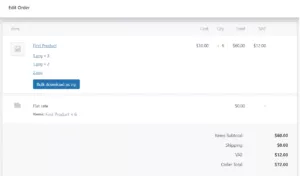
1 of 5
Features Overview
Features
Description
Drag & Drop File Upload
Modern, intuitive interface with drag-and-drop functionality for seamless file uploads
Chunked & Concurrent Uploads
Advanced upload system that handles large files efficiently with concurrent processing for better performance
Real-time Progress Tracking
Advanced upload system that handles large files efficiently with concurrent processing for better performance
Full WooCommerce Blocks Support
Complete compatibility with modern WooCommerce cart and checkout blocks
HPOS Compatible
Future-proof compatibility with WooCommerce's new order storage system
Variable Products Support
Works seamlessly with variable products, handling different variations and their pricing
Per-Product Configuration
Individual upload settings for each product with global override options
Multiple File Types Support
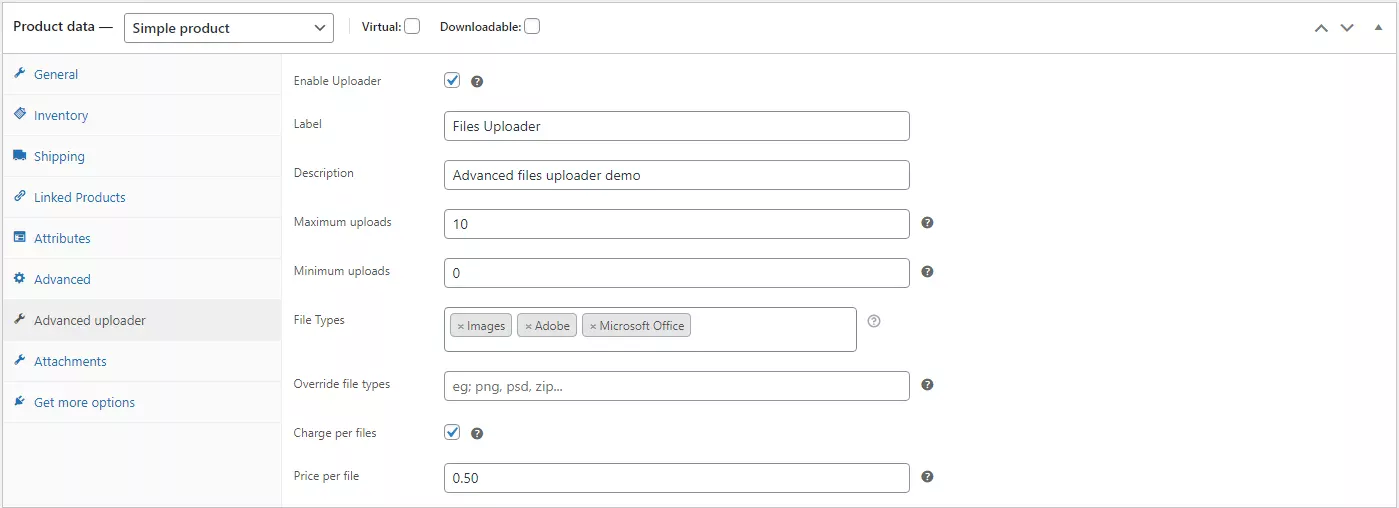
Support for images, archives, audio/video, Adobe files, MS Office documents, and custom file types
Dynamic Pricing Per File
Charge customers based on number of uploaded files with automatic price calculation
Advanced Quantity Controls
Individual file quantity management with minimum/maximum upload limits
Image Preview Generation
Automatic preview generation for uploaded images with customizable dimensions
Comprehensive File Management
Complete file lifecycle management from upload to order completion
Custom Filename Control
Advanced filename customization with prefixes, suffixes, and template tags (product_id, order_id, date, etc.)
Automatic File Cleanup
Smart cleanup system that automatically removes old files to save storage space
Secure File Validation
Multi-layer security with file type validation, size limits, and protection against malicious uploads
Queue-based Upload Management
Multi-layer security with file type validation, size limits, and protection against malicious uploads
Cart Integration
Seamless integration with WooCommerce cart, checkout, and order management
Customizable UI
Theme-friendly design with customizable colors and styling options
Developer-friendly
Extensive filter and action hooks for customization
Pricing Plans
Choose the plan that fits your needs
Most Popular
Annual
$29.99 Year
- Drag & Drop Uploader
- Per-Product Settings
- File Type Validation
- File Size Limits
- Advanced Image Cropping
- Per-File Pricing
- File Quantity Selector
- Large File Support
- WooCommerce Blocks Ready
- Custom Filename Rules
Lifetime
$199.99 One-Time
- Drag & Drop Uploader
- Per-Product Settings
- File Type Validation
- File Size Limits
- Advanced Image Cropping
- Per-File Pricing
- File Quantity Selector
- Large File Support
- WooCommerce Blocks Ready
- Custom Filename Rules
Frequently Asked Questions
Get answers to common questions
The plugin offers a “Charge per file” option. When enabled for a product, you can set a specific price that will be added for each file a customer uploads. If you also enable “Enable file quantity,” the price per file will be multiplied by the quantity the customer selects for that file. The total cost is then added to the product’s price in the cart.
Yes. If you enable the feature for a product, customers can use a built-in cropping tool to edit their images after uploading. You can set this to be optional or required. You can also define a fixed crop size, a specific aspect ratio, or allow free-form cropping.
When a customer uploads files, they are first stored in a temporary folder. Once the customer successfully places an order, the plugin moves the files to a permanent, secure folder and renames them according to the rules you’ve set (which can include the order number and product ID) for easy tracking and reference.
The plugin uses a technique called “chunking” to handle large files. It breaks the file into smaller pieces, uploads them one by one, and then reassembles the file on the server. This process ensures that large files can be uploaded reliably, even on slower connections, without timing out.
Absolutely. In the plugin settings for each product, you can specify a list of allowed file extensions (e.g., .jpg, .pdf, .zip), set a maximum file size for individual files, and set a minimum and maximum for the number of files a customer can upload for that product.
If a customer removes a product with associated uploads from their cart, the files they uploaded for that item are automatically deleted from your server’s temporary storage. This ensures your server space is managed efficiently and you don’t store unnecessary files.
Yes, the plugin is fully compatible with WooCommerce’s High-Performance Order Storage (HPOS) and the modern cart and checkout blocks. It integrates seamlessly to display uploaded file information and ensures a smooth experience for customers using the latest WooCommerce features.
What Our Customers Say
Real feedback from real users

Verified Purchase
Fantastic plugin, works really well and the developer is really helpful! Highly recommended.
23 Jun 2025
Verified Purchase
It's worth learning from this guy, you don't need to explain to him for long, he knows his business, from many other programmers, he differs in fast communication and quality of the work done. If necessary, I will definitely contact him. Ali, thank you very much
18 Jan 2024
Verified Purchase
An excellent plugin that allows you to upload multiple files and images easily and in a friendly way, and in addition their support is excellent and provides a quick response
12 Apr 2023
Verified Purchase
great plugin, light and functional, a great integration for my woocommerce project. The programmer is responsive, immediate response and above all immediate solution. In a short time I had what I needed. Big work! fully satisfied
17 Mar 2022