WooCommerce Card Testing: Why Failed Orders Are Flooding Your Store and How to Stop Them
•
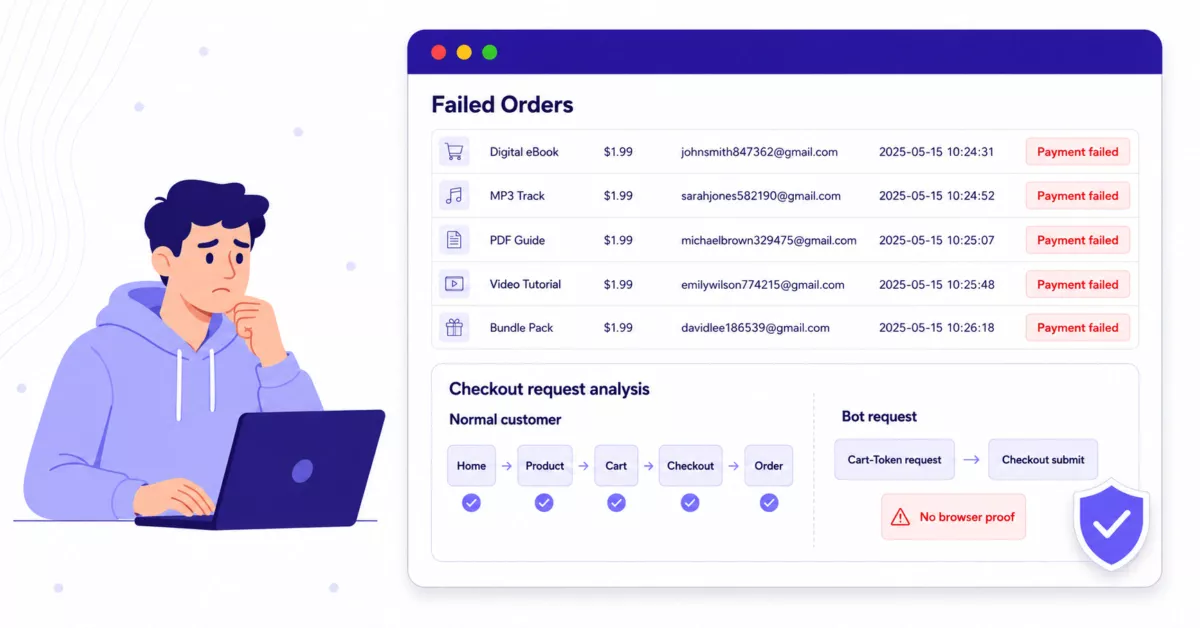
Open your WooCommerce orders screen one morning and find forty failed orders from the last hour, all for your cheapest product, all from email addresses that look generated. That is what card testing looks like from the inside of an attacked store.
We have walked into this situation more than once. The owner does not yet know what is happening. The payment gateway is already starting to flag the account. Support tickets are arriving from confused customers whose cards were used without their knowledge. The actual attacker is somewhere else entirely, running the same script against the next store on a list.
This post is the version we wish we could have handed those owners on day one. It explains what card testing actually is, why WooCommerce stores are being targeted more this year, how the attack reaches your checkout in the first place, and the layers of defense that work without breaking real customers.
What is card testing
Card testing is fraud preparation. Someone has bought or stolen a batch of card numbers and needs to find out which ones are still good. To find out, they need a working checkout somewhere on the internet to push small transactions through. Your store is the test rig.
The goal is not to buy anything. The goal is a single yes-or-no answer per card: did the charge go through? Cards that come back valid get sold or used for bigger fraud. Cards that come back declined get thrown away. From the attacker’s side, your store is a free oracle.
That is why the orders look so strange. Real customers do not order the same $1 product forty times in a row using forty different made-up email addresses.
Why WooCommerce stores are getting hit harder right now
Card testing is not new. What changed is the volume and the targeting.
Signifyd’s most recent State of Fraud and Returns report found card testing climbing 65% between Q2 2024 and Q2 2025, and noted that fraudsters have started shifting from cheap throwaway products to more expensive resalable items so a successful test doubles as a profitable order. The Merchant Risk Council’s 2026 Global eCommerce Payments and Fraud Report, released in March and based on responses from 1,278 merchant professionals across 37 countries, found that merchants faced an average of 3.7 different fraud attack types in 2025, with card testing remaining a top concern alongside refund abuse and real-time payment fraud.
WooCommerce sits in the crosshairs for a specific reason. It is the most common ecommerce platform on the web, the storefronts look broadly similar from the outside, and the public checkout endpoints are predictable. A script written against one WooCommerce store works against most of them. That is the kind of target attackers love.
The real cost, even when the cards get declined
Store owners sometimes ask whether failed orders actually matter. The card was declined. The money is fine. So what is the problem?
The problem is that the payment gateway sees the same thing you see, and treats it as your reputation rather than the attacker’s.
A sustained pattern of declines pushes your account toward risk review. Stripe, PayPal, and similar processors will raise your reserve, pause payouts, request documentation, and in some cases close the merchant account entirely. Every successful test that gets through can become a chargeback weeks later, and each dispute carries a non-refundable fee in the $15 to $25 range even when you eventually win. Add the operational mess of cleaning up the WooCommerce orders table, the noisy email notifications, possible inventory holds depending on your setup, and the staff time spent figuring out what is going on. None of this revenue is yours, but all of the cost is.
That is why card testing is worth taking seriously the moment you notice it, not after the gateway calls.
How the attack actually reaches checkout
Stopping this cleanly is easier once you understand how the bot is getting to your checkout in the first place. We will keep this defensive and concrete, no payloads.
A real customer takes a long path. They land on a page from a search or an ad, click around, view a product, add it to the cart, open the cart, open the checkout page, fill in their details, and submit the order. Their browser loads JavaScript along the way, stores cookies, sends referrer headers, and follows redirects.
A card testing bot does not need most of that. The modern WooCommerce stack exposes a public Store API at /wp-json/wc/store/v1/ that supports adding items to a cart and submitting orders without ever loading the checkout page in a browser. The endpoints are there for legitimate reasons. Block-based checkout uses them. Headless stores need them. Mobile apps depend on them.
A bot can hit the cart endpoint to obtain the session values that WooCommerce expects on a checkout submission, then post a checkout request directly with billing details and a payment method. WooCommerce creates the order. The payment gateway then either approves or declines the card. Either way, the bot got its answer, and your store paid for it.
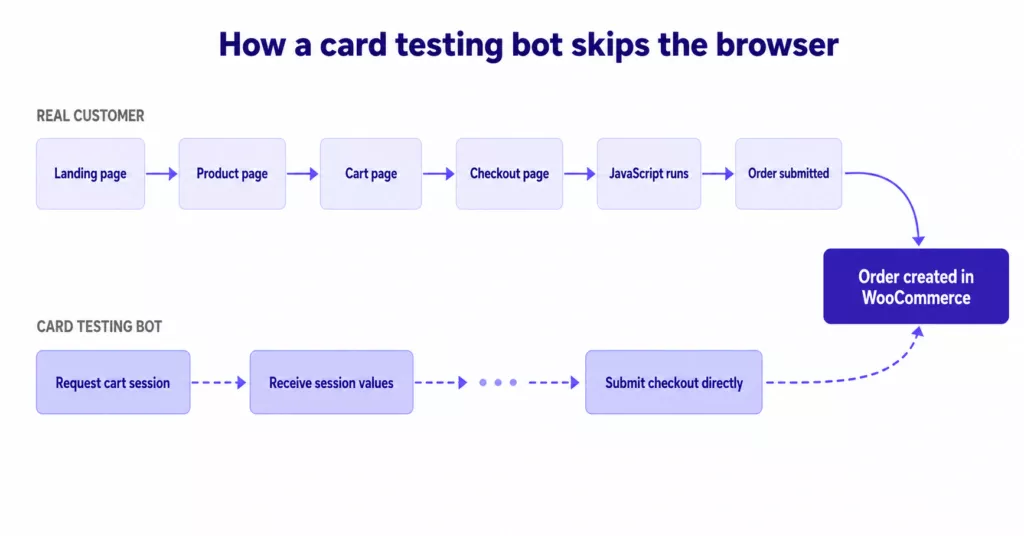
The cart session values help WooCommerce manage the cart and validate that a checkout request matches a real cart. They do not prove that a real browser ever loaded the checkout page. That distinction is the entire reason this attack works.
What it looks like in your logs
WooCommerce admin tells you that orders failed. Your access logs tell you how those orders were attempted, which is much more useful for spotting an attack in progress.
The signals are almost never definitive on their own. A missing referrer can be a privacy setting. A Chrome user agent on a server request is suspicious but not proof. A cheap product is sometimes popular for normal reasons. What identifies card testing is the combination, repeated quickly.
The pattern we see in real attacks tends to look like this: checkout submissions arriving through the Store API rather than the regular browser checkout path, empty or missing referrer headers, the same Chrome-mimicking user agent on every request, billing emails that look generated (a common first name followed by a long random number, usually at gmail or proton), the same low-value product appearing over and over, requests grouped tightly in time, traffic concentrated on hosting and proxy provider IP ranges rather than residential ones, and sometimes multiple payment methods attempted through the same route as the attacker tries to find any path that works.
A simplified log view during an active attack tends to look something like this:
10:41:02  POST /wp-json/wc/store/v1/cart                cart session created
10:41:03  POST /wp-json/wc/store/v1/checkout            order #12047  payment_failed
10:41:05  POST /wp-json/wc/store/v1/cart                cart session created
10:41:06  POST /wp-json/wc/store/v1/checkout            order #12048  payment_failed
10:41:08  POST /wp-json/wc/store/v1/cart                cart session created
10:41:09  POST /wp-json/wc/store/v1/checkout            order #12049  payment_failed
The exact route names and codes vary by checkout configuration and gateway. The shape is what matters. A burst of cart-session-then-checkout calls with no preceding browser journey, repeated every few seconds, is not how human customers behave.
What does not work, and why
Two common reactions to this problem make sense at first and then create new problems. Both are worth knowing about before you reach for them.
The first is dropping a CAPTCHA on the checkout page. CAPTCHA, reCAPTCHA, hCaptcha, and Turnstile are all useful tools, but they only run for visitors who actually load the page where the challenge lives. A bot that talks directly to the checkout API never sees that page, so the CAPTCHA never gets evaluated. Meanwhile, real customers on slow connections, in privacy modes, or behind shared corporate proxies start failing challenges and abandoning carts. Aggressive CAPTCHA is a known conversion killer, and against this particular attack, it is fighting the wrong layer.
The second is blocking the Store API completely. Sometimes this works. We have one client whose store does not use Block Checkout, has no mobile app, and no headless frontend, and the fastest fix there was simply removing the route. The fake orders stopped that day. But this is the exception. Most stores cannot do this without breaking something. Block Checkout depends on the Store API. Headless stores depend on it. Some payment integrations call it during the order flow. Block the route blindly and real checkout breaks along with the bots.
The useful question is not how to shut down the API. It is how to let the API keep working for legitimate clients while rejecting requests that obviously did not come from a real checkout session.
The missing layer: proof that a real browser was there
A real customer’s browser does things a script does not bother to do. It loads pages. It runs JavaScript. It stores cookies the JavaScript sets. It sends those cookies back on subsequent requests. A script that posts straight to /wp-json/wc/store/v1/checkout can fake the JSON body easily, but it generally does not load the checkout page first, and that is the gap to use.
The standard pattern for this is the double-submit cookie. When the checkout page loads in a real browser, a small piece of JavaScript generates a random proof value, writes it to a cookie, and arranges for the same value to be sent in a header or hidden field with the checkout request. The server then checks that both copies of the value are present and that they match. A real browser that loaded the page will have both. A script that posted straight to the API will have neither.
This is not a new idea. It is a standard CSRF defense, used widely outside WooCommerce. What makes it useful here is the timing. The check happens before WooCommerce creates the order. The failed orders never appear. The gateway never sees the declines. Your store stops being a card validator.
The thing to get right is the fallback path. You still need legitimate non-browser clients to be able to check out. Block-based checkout that calls the API as part of its normal flow, native mobile apps, headless frontends, and approved server-to-server integrations should not be treated as bots. Any browser-proof system needs a clean way to whitelist those, usually with a signed key or an explicit allowlist, not a loose IP rule.
A layered defense that actually works
No single thing stops every variant of this attack. What works is layers, where each layer catches something the others miss, and where no single layer has to be perfect.
At the network edge: rate limiting on checkout endpoints, blocking known abusive ASNs, and using a CDN or WAF that recognizes obvious bot traffic. This catches volume, not subtlety.
At the checkout layer: browser-session proof on checkout API requests, sensible rules on how many cart-to-checkout cycles a single session can perform per minute, and clear logs of every rejected attempt so the pattern is visible. This is where the bulk of card testing dies, before WooCommerce ever creates an order.
At the gateway: Stripe Radar, PayPal risk rules, WooPayments fraud tools, AVS, CVC checks, and 3D Secure where it makes sense. These are real defenses against payment fraud generally, including the small fraction of testing traffic that still slips through.
At the operations layer: auto-cancel rules for failed orders so the order table does not become unusable, monitoring for failed-order bursts, and a documented response procedure so the team knows what to do when it happens.
The order of the layers matters. Catching a bot at the network edge costs almost nothing. Catching it at the checkout layer costs a single request. Catching it at the gateway costs you a decline event on your merchant account. Cleaning it up after the fact costs hours.
A practical response when you are already under attack
If you opened this article because the failed orders are already happening, the immediate steps are short.
- Sort recent failed orders by timestamp and confirm whether they are clustered in bursts. A burst with the same low-value product is the clearest tell.
- Cross-reference the timestamps against your access logs to confirm whether the orders arrived through the Store API path or the regular checkout page.
- If the attack is loud, temporarily hide the affected product or remove it from public catalogs to break the rhythm. This is not a fix, but it buys time.
- Enable browser-session verification on checkout API requests so the attack stops creating orders. This is the actual fix.
- Notify your payment processor proactively. Gateways view a controlled, explained spike of declines very differently from a silent one they had to discover themselves.
- Once protection is in place, verify that normal browser checkout still works end to end. A protection layer that also blocks real customers is worse than the attack.
- Set up alerting so the next attempt is noticed in minutes rather than days.
One thing to avoid through all of this: do not store or collect card numbers as part of your analysis. You do not need them. Order IDs, timestamps, route paths, user agents, referrers, product IDs, payment method names, and response codes are enough to understand the attack and design the response.
Where Checkout Shield fits
The browser-session proof layer is the gap we built Checkout Shield for WooCommerce to fill. It sits on the Store API checkout path, validates that the request carries the cookie and header a real browser checkout flow would produce, and rejects requests that do not before WooCommerce creates the order.
Checkout Shield is not a fraud detection engine and it does not replace one. Stripe Radar, PayPal risk tools, WooPayments fraud rules, AVS, CVC, and 3D Secure are still the right tools at the payment layer, and you should keep them. Checkout Shield works one layer earlier, at the WooCommerce checkout request itself. Its only job is to make sure the request came from a real checkout session before WooCommerce treats it as one.
It ships with a Learning mode for stores with custom or headless setups so you can confirm what counts as legitimate traffic before turning enforcement on, a Balanced mode for normal stores, API keys for approved server-to-server integrations, and clear logs of every blocked request so the pattern is visible instead of guessed. None of that is decoration. Real stores have real exceptions, and a protection layer is only useful if it can live with them.
What this does not solve
The limits are worth being honest about.
Browser-session proof stops checkout abuse that depends on skipping the browser. It does not stop fraud that happens inside a real browser session: friendly fraud where a real customer disputes a real order, account takeover where the attacker uses a legitimate account, or sophisticated automation that fully renders pages and runs JavaScript. For those, you need gateway risk tools, dispute evidence discipline, and in some cases manual review.
For the common WooCommerce card testing pattern, where bots talk straight to the checkout API and submit orders that never came from a browser, the right line to draw is at the checkout request itself. Legitimate customers keep checking out. The bots stop getting their yes-or-no answers. Your gateway stops seeing a decline pattern that was never yours to begin with.
Further reading
For more background, Stripe’s documentation on card testing fraud and how Radar responds to evolving tactics are worth reading. WooCommerce’s official guide to preventing and responding to card testing attacks covers the platform-level recommendations. And if you want the protection layer Checkout Shield provides, the plugin page is here.
About the Author

Table of Contents
- What is card testing
- Why WooCommerce stores are getting hit harder right now
- The real cost, even when the cards get declined
- How the attack actually reaches checkout
- What it looks like in your logs
- What does not work, and why
- The missing layer: proof that a real browser was there
- A layered defense that actually works
- A practical response when you are already under attack
- Where Checkout Shield fits
- What this does not solve
- Further reading