
Deposits & Payment Plans for WooCommerce
The official deposits plugin cannot charge the balance at all: it emails the customer and hopes. This one takes the deposit, then charges the rest to the card they already used, on any gateway that supports WooCommerce Subscriptions.
What It Does & What It Needs
Carticy Deposits & Payment Plans lets a WooCommerce store take part of an order’s price at checkout and collect the rest on a schedule. Every later payment stays tied to the original order.
Automatic collection requires WooCommerce Subscriptions
Read this before buying, because it decides what the plugin can do on your store.
Charging a later payment against the card the customer used at checkout, without the customer doing anything, requires WooCommerce Subscriptions. Subscriptions is sold separately by WooCommerce and is not included.
This is not a limitation of this plugin. Payment gateways switch their stored-card charging off unless WooCommerce Subscriptions is present, and WooCommerce on its own can save a card but cannot charge one later.
With Subscriptions installed, automatic collection works on any gateway that supports WooCommerce Subscriptions. That is over thirty gateways, including Authorize.Net, Braintree, Square, Elavon and Moneris.
You do not have to work out which case your store is in. The Payment plans screen names the payment methods that can be charged on a schedule and the ones that will send the customer a link, read from your own settings, and it says so before you have sold anything.
Without WooCommerce Subscriptions
The plugin still runs, and nothing is hidden from you when it does. The schedule, the deposit at checkout, the fulfilment hold and every admin screen work as documented. Each later payment is collected by the customer paying a link from their account instead of being charged automatically, and the order records which of the two happened and why.
What you can build
- Any number of payments, not only a deposit and a balance.
- Each payment as a percentage of the price or as a fixed amount. Percentages are resolved to exact figures when the customer buys, so the payments always add up to what was charged.
- Due dates set as an offset from purchase, as a fixed calendar date, or counted backwards from a deadline on the product.
- A payment with no date at all, collected only when you decide. This is how a pre-order or a pledge works: a small deposit at checkout, and the rest charged once you confirm the order. Nothing charges it before then.
- Repeating plans, which split one recurring charge into a pattern of different amounts.
- Fulfilment held until a nominated payment clears.
What you can do with the balances
- See every balance still owed across the store on one screen, filter to one product, and charge a reviewed set of them in one action.
- Cancel a set of orders and refund everything collected on them in one reviewed action, through the payment method each customer paid with. This is how a campaign that does not go ahead is wound up.
- Read on every order how its next payment will be collected, and why, before the date arrives.
Every plan checkout creates an account and saves the card
A customer buying on a plan creates an account at checkout, and the card they pay with is saved to it for the later payments. The checkout tells them so, in place of the usual save-card box, and there is no box to untick. This is not a setting. A later payment can only be charged to a saved card, and a plan sold without one is a plan you would have to chase by hand.
An order that reaches you with no saved card anyway, for example one placed before this version, says so on the order screen, and its payments are collected by payment link instead. See Troubleshooting.
Requirements
- WordPress 6.4 or higher
- WooCommerce 8.3 or higher
- PHP 8.1 or higher
- WooCommerce Subscriptions, for automatic collection only
- A gateway that saves cards, for automatic collection only
- Customers buying on a plan create an account at checkout. Guest checkout stays on for everything else you sell
High-Performance Order Storage and the legacy post storage are both supported. Classic checkout and Checkout Blocks are both supported.
Product types
Plans are offered on simple and variable products. A variation can use its parent product’s plans or carry its own.
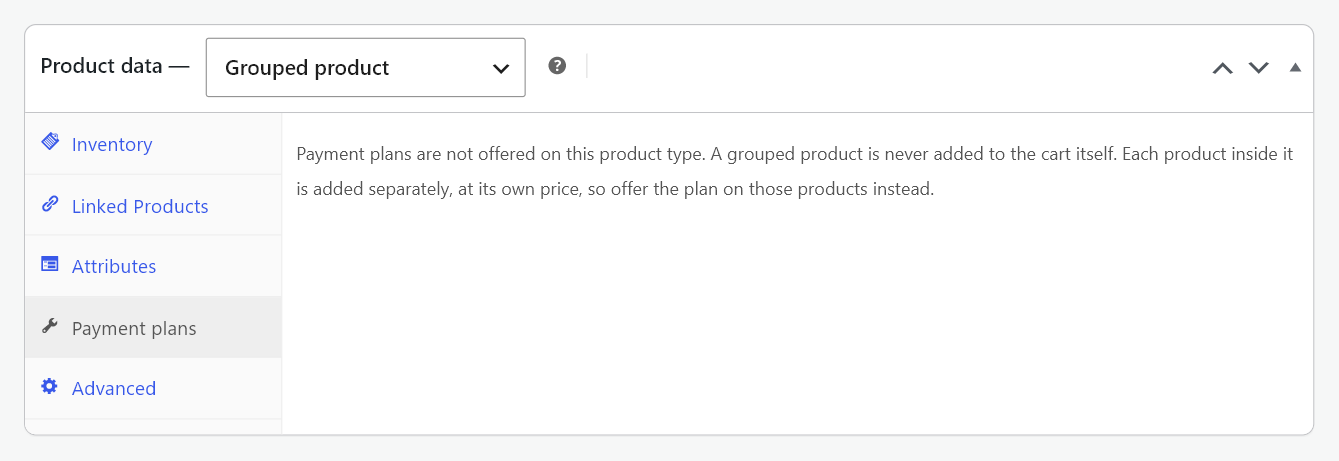
Four product types are refused. On each of them the Payment plans tab says which and why, in place of the fields:
- Grouped products. A grouped product is never added to the cart itself. Each product inside it is added separately at its own price, so the plan belongs on those products.
- External products. An external product is bought on another site, so this store never takes its payment and cannot schedule one.
- Product bundles. A bundle is one purchase spread across several cart lines, and a schedule worked out on any one of those lines is not a schedule for the bundle.
- Composite products. A composite is one purchase assembled from several cart lines, for the same reason.
Subscription products are a fifth case, handled differently: the Payment plans tab does not appear on them at all. A subscription already has a billing schedule, and a second schedule on the same purchase is outside this release.
What it does not do
- It does not replace WooCommerce Subscriptions. This is for a purchase paid in parts, not for a recurring subscription.
- It does not sell a plan and a subscription on the same order.
- It does not withdraw a plan as a product’s deadline approaches. A customer buying close to the date is sold the plan, and any payment whose date has already passed becomes due on the day of purchase.
Next steps
See Installing and Licensing to get started.