
Checkout Shield for WooCommerce
Your CAPTCHA protects the form. This protects the API. Most store owners don't realize the attacks aren't even hitting their checkout page.
Checkout Shield Quick Start: Recommended Protection Setup
This quick start is the recommended setup for most WooCommerce stores after installation.
Recommended setup
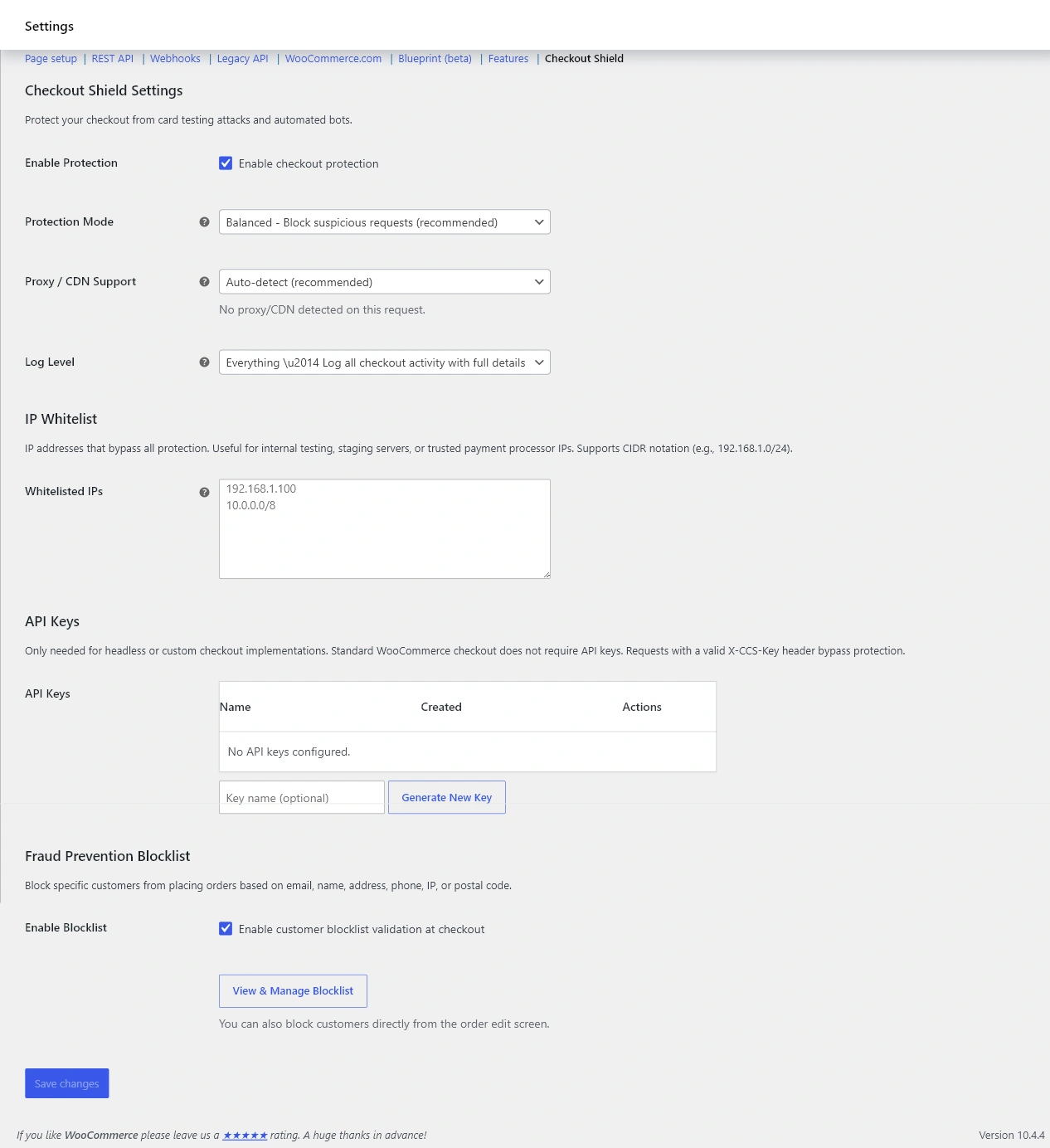
- Go to WooCommerce > Settings > Advanced > Checkout Shield.
- Turn on Enable Protection.
- Set Protection Mode to Balanced.
- If your store uses Cloudflare, a load balancer, or another proxy, review Proxy/CDN Support before saving.
- Click Save changes.
What to test first
- Place a test order as a normal guest customer.
- Place a test order as a logged-in customer if your store accepts account checkouts.
- Confirm the payment gateway returns to the order-received page correctly.
- Check recent activity or logs for unexpected blocks.
When to use Learning mode first
Use Learning mode for the first day on stores with heavy cache rules, uncommon payment flows, custom checkout fields, headless checkout, or traffic routed through a CDN. Learning mode records suspicious patterns without blocking customers.
Related
Understand each mode in Protection Modes Explained. Behind a CDN or proxy? See IP Whitelist and Proxy/CDN Support. Run a safe verification with Testing Checkout Protection Safely.