
Product Builder for WooCommerce
Visual product configurator with tile selection, conditional logic, file uploads, and smart formula pricing. The modern WooCommerce product addons alternative.
Enable Product Builder on a Product
Product Builder is enabled per product, so configurable options only appear where they are needed. The builder controls live in their own metabox on the product edit screen.
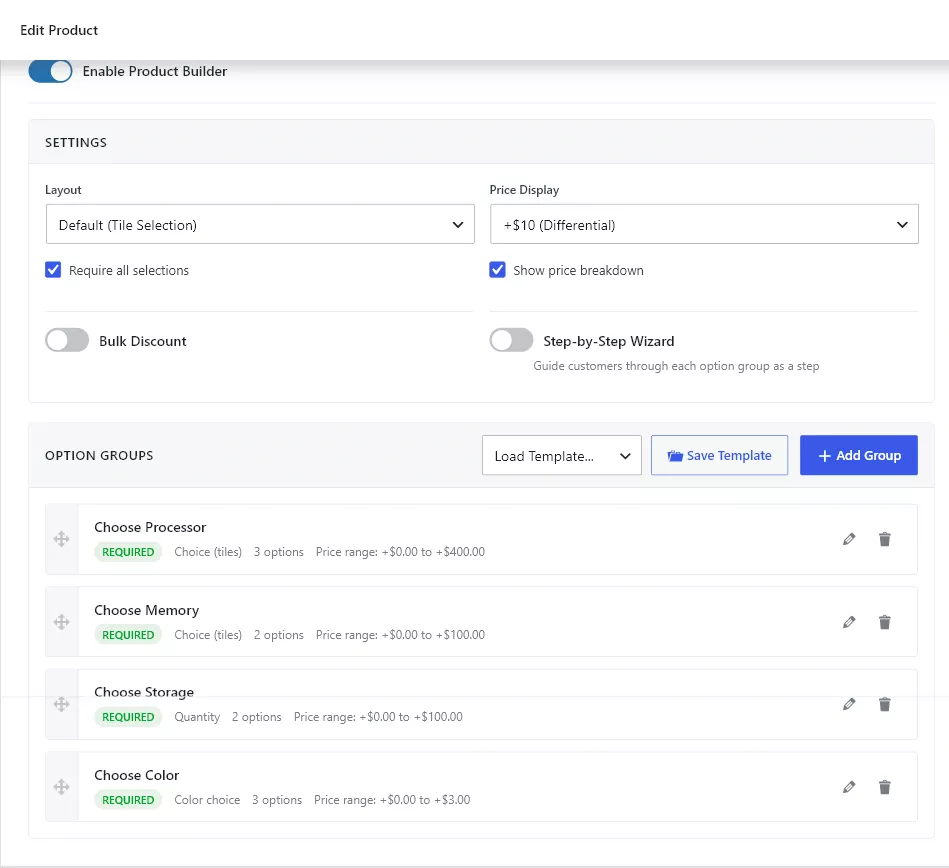
Enable builder mode
- Edit the WooCommerce product.
- Scroll to the Product Builder metabox.
- Turn on Enable Product Builder.
- Choose a Layout and a Price Display style.
- Set Require all selections and Show price breakdown to match the product.
- Add option groups (see Option Groups and Templates).
- Save the product and test the frontend.
Settings reference
- Layout — how groups are laid out on the product page. Default renders all groups stacked. The Wizard layout turns each group into a step.
- Price Display — how each option’s price contribution is shown next to the label. Differential shows the adjustment (
+$10.00). Absolute shows the final price ($110.00) the option would result in. Differential reads better for small add-ons; Absolute reads better when each option fully replaces the base price (e.g. a size that defines a different SKU). - Require all selections — blocks Add to Cart until every required group has a value. Use it for kits, bundles and made-to-order builds.
- Show price breakdown — renders the per-group line items and a Total under the builder so the customer can see how their selections add up.
- Bulk Discount — tier-based discounts based on how many options or units the customer configures. See Pricing and Bulk Discounts.
- Step-by-Step Wizard — presents groups as steps with progress indicators and an optional review step.
Save the product and test the frontend after every major builder change. Selections, price breakdowns and required validation are all visible without leaving the product page.